
Houdini Workflows
Practical ways to organise Houdini work for a team: loops, feedback, HDAs, TOPs/PDG, external data, and readable node graphs. Each pattern helps make a setup easier to test, reuse, or maintain.
On this page
Thinking ProcedurallyFor-Each Loops And Feedback LoopsBuilding Reusable HDAsTops/Pdg For Batch ProcessingOrganising Complex NetworksWorking With External DataProduction HabitsA useful Houdini setup needs more than the right result on one input. The patterns below help you handle different inputs, share controls, and make it clear how the result was produced.
2.1Thinking Procedurally
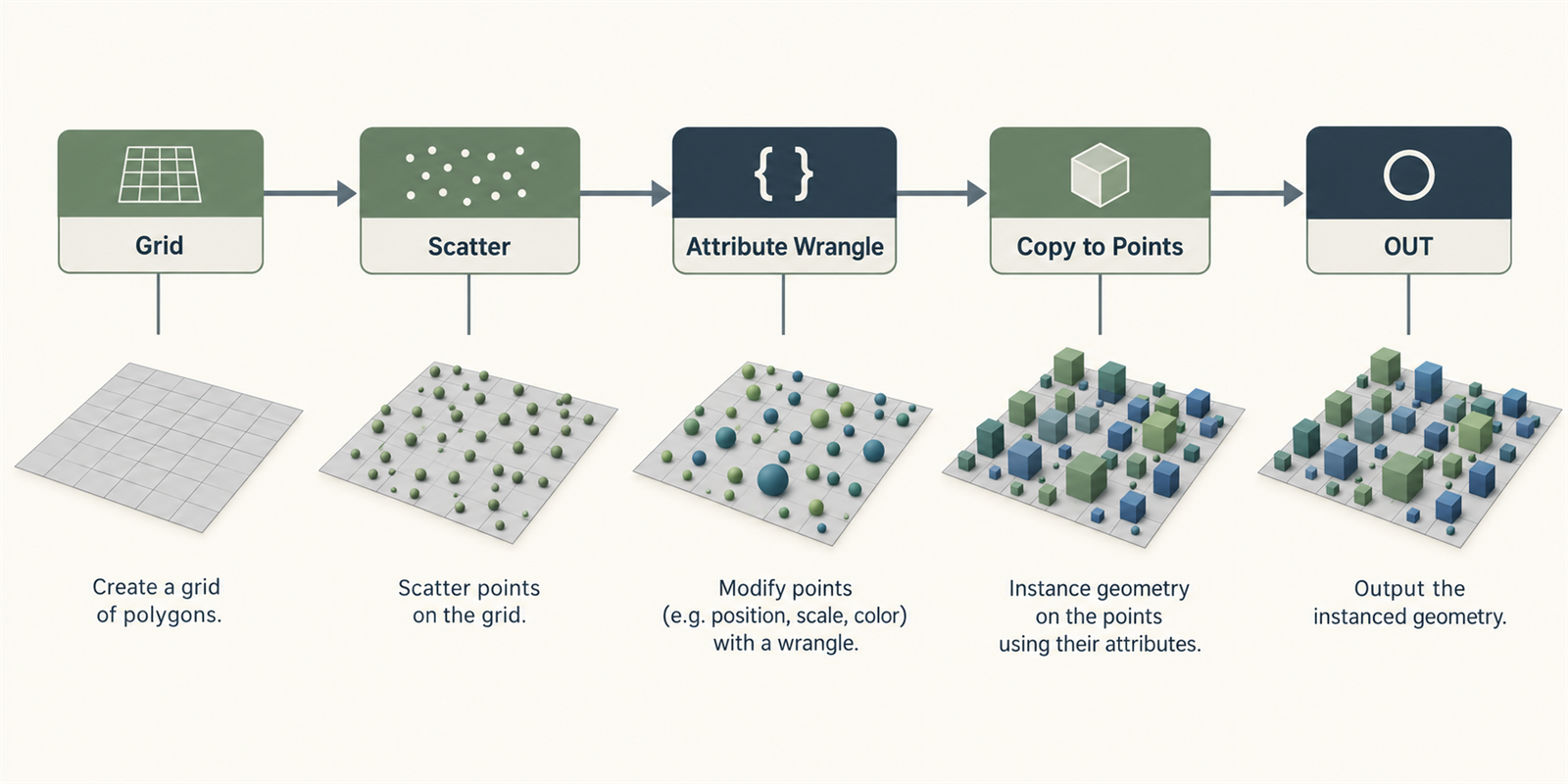
The big shift from Maya or Blender is that you stop making one result and start making the machine that makes results. Each node is an instruction. Change the input, change a parameter, swap a CSV, and the network should still know what to do.
The habits that make that work:
- Parameterise the stuff artists will touch - Hard-coded numbers become sliders, menus, ramps, or channel refs like ch("my_param").
- Think in data, not just shapes - Geometry is points, prims, and attributes. A wall can be points with @height, @thickness, and @material.
- Test with more than one input - Include small, large, and unexpected inputs so the tool’s limits are visible.
- Keep each node’s purpose clear - One node does one clear thing. Complexity comes from the chain, not from mystery nodes that do eight jobs.
Before building a network, write out the steps in plain language: "For each building footprint -> extrude to random height -> add windows based on floor count -> assign material by zone." Then translate each step into a node or group of nodes.
2.2For-Each Loops And Feedback Loops
Loops let you apply an operation to separate pieces of geometry, or feed one result into the next iteration. Choose the loop type based on whether each piece can be processed independently.
For-Each Connected Piece
This is the "treat every chunk separately" loop. Use it when a pile of connected pieces needs individual scale, rotation, cleanup, naming, or export prep.
The usual setup:
- Use a Connectivity SOP to create a class attribute.
- Add a For-Each Named Primitive block, or loop over @class.
- Inside the loop, Houdini shows you one piece at a time.
- Transform, fix, name, or process that one piece, then merge everything back together.
// Pre-loop: assign unique piece IDs and random values
// Run this Wrangle BEFORE the for-each loop

// Give each piece a random scale and rotation
int piece = i@class;
float seed = float(piece) * 13.37;

f@rand_scale = fit01(rand(seed), 0.6, 1.4);
f@rand_rot = fit01(rand(seed + 1), -30, 30);
v@centroid = getbbox_center(0);
// Inside for-each loop: transform each piece independently
// This runs on each piece in isolation

vector center = getbbox_center(0);
float scale = f@rand_scale;
float rot_deg = f@rand_rot;

// Move to origin, scale, rotate, move back
@P -= center;
@P *= scale;

float angle = radians(rot_deg);
matrix3 m = ident();
rotate(m, angle, {0, 1, 0});
@P *= m;

@P += center;
Feedback Loops (Iterative Solving)
Feedback loops feed the result of one pass back into the next pass. They're great for growth, relaxation, erosion-ish ideas, and any setup where "do it once" isn't enough.
// Feedback loop: iterative point relaxation
// Block Begin set to "Fetch Feedback", iterations = 20

// Average each point's position with its neighbors
int nbs[] = neighbours(0, @ptnum);
if(len(nbs) == 0) return;

vector avg = {0, 0, 0};
foreach(int nb; nbs) {
 avg += point(0, "P", nb);
}
avg /= float(len(nbs));

// Blend toward average (relaxation factor)
float blend = chf("relax_strength"); // 0.1-0.5 works well
@P = lerp(@P, avg, blend);Feedback loops cook in order. Iteration 12 needs iteration 11, so Houdini can't magically parallelise the whole thing. Keep the geometry light, or move heavy simulation-style work into a solver setup.
2.3Building Reusable HDAs
An HDA turns a node network into a reusable tool with defined inputs and controls. The next page covers the details of editing and distributing one safely.
The short version: build the network around a clean OUT null, collapse it to a subnet, create a digital asset with a namespaced name like studio::wall_generator::1.0, expose only the controls artists need, and store the .hda in a shared version-controlled library. Good loops, good names, and tidy networks are what keep the inside maintainable.
2.4Tops/Pdg For Batch Processing
TOPs, powered by PDG, are Houdini’s system for organising batch work. They turn frames, files, wedges, and export jobs into work items that can run locally or on a farm.
Common Top Patterns
- Wedging - Generate parameter variations and cook them side by side.
- File processing - Read a folder, process each file, write predictable outputs.
- Frame rendering - Split frame ranges across local cores or farm machines.
- Data pipelines - Chain CSV ingestion -> geometry generation -> export.
# Python Processor TOP - generate work items from file list
# Place this in a Python Processor node's "Generate" callback

import os

asset_dir = self.parm("asset_directory").eval()
extensions = (".bgeo.sc", ".obj", ".fbx")

for filename in os.listdir(asset_dir):
 if filename.endswith(extensions):
 item = item_holder.addWorkItem()
 filepath = os.path.join(asset_dir, filename)
 item.setStringAttrib("filepath", filepath)
 item.setStringAttrib("asset_name", os.path.splitext(filename)[0])
item.setIntAttrib("index", item_holder.numWorkItems() - 1)# Wedge setup with Python - generate parameter combinations
# In a Python Processor TOP
import itertools
noise_freqs = [0.5, 1.0, 2.0, 4.0]
seed_values = [0, 42, 99, 256]
subdivisions = [2, 3, 4]
for freq, seed, subdiv in itertools.product(noise_freqs, seed_values, subdivisions):
item = item_holder.addWorkItem()
item.setFloatAttrib("noise_freq", freq)
item.setIntAttrib("seed", seed)
item.setIntAttrib("subdivisions", subdiv)
label = f"freq{freq}_seed{seed}_sub{subdiv}"
item.setStringAttrib("wedge_label", label)Use the built-in Wedge TOP for simple sweeps. Reach for Python Processor TOPs when you need custom logic: reading databases, filtering file lists, calling APIs, or generating custom work items.
2.5Organising Complex Networks
A large graph is easier to debug when its stages and outputs are clear. These habits help the next person follow the work, including you when you return to it later.
Network Hygiene Rules
- Name every node - scatter_trees, not scatter2. Lowercase with underscores is boring in the best way.
- Use Nulls as bookmarks - OUT_terrain, CTRL_settings, REF_guide_curves.
- OUT_ - Final output of a section.
- CTRL_ - Parameter controller node, usually the thing artists touch.
- REF_ - Reference geometry that shouldn't keep getting processed.
- Group real stages - Terrain, scatter, buildings, and export each deserve a subnet or HDA when they get big.
- Colour-code consistently - Green outputs, blue references, yellow debug. Pick a system and stick to it.
- Sticky-note the reason - "Offset needed to compensate for pivot mismatch in FBX export" helps. "This is a transform" doesn't.
Network Boxes (select nodes -> Shift+O) are great for visual grouping when a subnet would be too heavy. They don't change scope, so they keep the existing node scope. Label them clearly.
2.6Working With External Data
Production Houdini rarely lives alone. It reads CSVs, JSON configs, databases, build outputs, and weird little files from other tools. Here's the basic pattern for getting that data into geometry.
Reading CSV Data
# Python SOP - read CSV and create points from coordinates
import csv

node = hou.pwd()
geo = node.geometry()
geo.clear()

csv_path = node.parm("csv_file").eval()

with open(csv_path, "r") as f:
 reader = csv.DictReader(f)
 for row in reader:
 pt = geo.createPoint()
 pt.setPosition(hou.Vector3(
 float(row["x"]),
 float(row["y"]),
 float(row["z"])
 ))

 # Transfer any extra columns as attributes
 if "name" in row:
 if geo.findPointAttrib("name") is None:
 geo.addAttrib(hou.attribType.Point, "name", "")
 pt.setAttribValue("name", row["name"])

 if "scale" in row:
 if geo.findPointAttrib("pscale") is None:
 geo.addAttrib(hou.attribType.Point, "pscale", 1.0)
 pt.setAttribValue("pscale", float(row["scale"]))
Reading JSON Configuration
# Python SOP - read JSON config and set detail attributes
import json

node = hou.pwd()
geo = node.geometry()

json_path = node.parm("config_path").eval()

with open(json_path, "r") as f:
 config = json.load(f)

# Store each config value as a detail attribute
for key, value in config.items():
 if isinstance(value, (int, float)):
 geo.addAttrib(hou.attribType.Global, key, value)
 geo.setGlobalAttribValue(key, value)
 elif isinstance(value, str):
 geo.addAttrib(hou.attribType.Global, key, "")
 geo.setGlobalAttribValue(key, value)
 elif isinstance(value, list) and len(value) == 3:
 geo.addAttrib(hou.attribType.Global, key, hou.Vector3())
geo.setGlobalAttribValue(key, hou.Vector3(value))// Read the JSON-loaded detail attributes downstream in VEX float grid_size = detail(0, "grid_size"); string biome = detail(0, "biome_type"); int seed = detail(0, "random_seed"); // Use config values to drive generation float freq = grid_size * 0.1; @P.y = snoise(@P * freq + seed) * detail(0, "height_scale");
2.7Good Habits For Production
Once other people depend on a setup, the boring habits become the important ones:
- Use $HIP and $JOB for paths - Machine-specific absolute paths can break when the scene moves. Keep files relative to the scene or project root.
- Use Takes for variations - Don't duplicate the whole network just to change five parameters.
- Cache aggressively - Put File Cache nodes at expensive stages. Name caches like you expect someone to debug them: $HIP/cache/terrain_base.v001.bgeo.sc.
- Pre-compute expensive work - VDB meshing, booleans, sims, and heavy scatters shouldn't re-cook just because someone nudged a colour.
- Work low-res first - Drive a Switch SOP from a preview/final toggle so artists can iterate quickly.
- Leave notes - Future you won't remember why that Transform SOP has exactly those values. Be kind to them.
// Quality switch pattern - use in a Switch SOP expression
// Switch input 0 = low-res, input 1 = high-res
// Expression on Switch: ch("../CTRL_settings/high_quality")

// Low-res wrangle: reduce density for fast iteration
f@density *= 0.1;
i@subdivisions = 1;

// High-res wrangle: full quality settings
f@density *= 1.0;
i@subdivisions = chi("../CTRL_settings/subdiv_level");Create a CTRL_settings null near the top with the global controls: quality, seed, output path, density, whatever matters. Reference it from the rest of the graph. Artists can find the main controls in one place.
If these patterns make sense, go deeper into VEX for the per-point logic, or Python in Houdini for shelf tools, exports, and pipeline glue.